

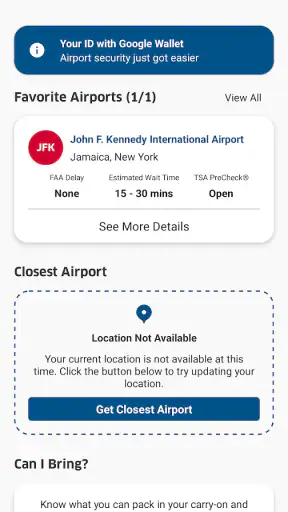
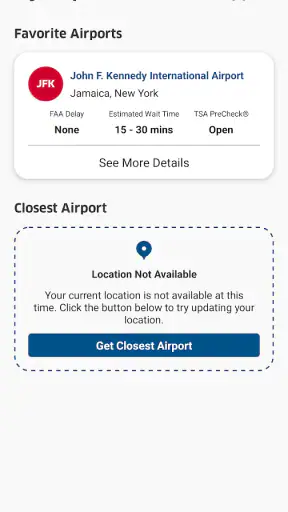
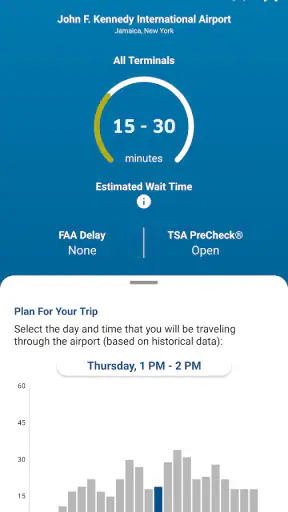
When I travel by air, I want answers that are practical rather than buried in a long general search. That is where MyTSA makes sense: it is a free Travel & Local app from TSA Mobile Team, built around the questions passengers commonly have before heading to an airport. I found its value less in replacing every travel tool and more in giving me a direct place to check TSA-related information when timing, screening, or preparation matters.
The app has been around since November 1, 2012, and its reach is substantial, with over a million installs. Its current version is 5.1.0, and it is intended for users on operating system version 10 or later. Those details matter because this is not a brand-new experiment that I would treat as an untested extra; it is an established government-focused utility that has continued to receive updates. At the same time, its average rating is 3.9 from around 4,500 ratings, so I would not describe the experience as flawless.
What MyTSA is really useful for
My first impression is that MyTSA works best as a focused reference tool. It is not the same kind of product as a flight-booking service, an airline app, a map, or a full itinerary organizer. Those alternatives are better for reservations, boarding passes, route changes, and broader trip planning. MyTSA has a narrower job: helping passengers find TSA information without relying entirely on scattered searches or informal advice.
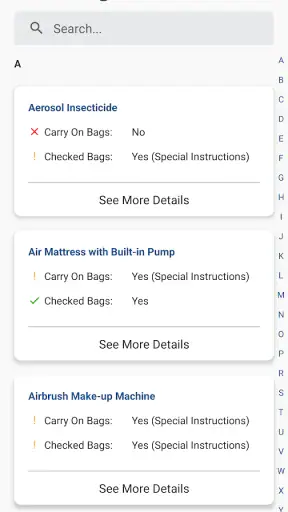
That focus is a strength when I am preparing for a trip and have one specific concern. I might be wondering whether an item belongs in my carry-on, what to expect at screening, or where to look for official passenger guidance. Instead of opening several unrelated pages, I can start with the app and use it as a first reference point. I still treat the result as something to read carefully, especially when an item is unusual or my situation involves special circumstances.
The app is also useful for travelers who do not want to create a complete travel profile just to answer a basic security question. A general travel platform often asks me to manage flights, airports, notifications, and personal trip details. That can be convenient, but it is unnecessary when I only need screening information. MyTSA’s narrower purpose can therefore feel more respectful of my attention and, depending on what I choose to do inside it, less demanding than a full travel ecosystem.
There is an important distinction here: a direct source is not automatically a complete source. Airport operations, airline rules, and security procedures can overlap without being identical. I would use MyTSA for TSA-related guidance, then check the airline or airport separately for baggage fees, terminal changes, gate information, and flight disruptions. Expecting one app to cover all of those areas is the quickest way to become frustrated.
How I would use it before leaving home
My most practical workflow would be to open the app several days before departure, look up the questions that could affect packing, and make a short note of anything that needs extra attention. I would not wait until I am standing in the security line. A small amount of preparation is especially helpful for toiletries, food, gifts, equipment, or anything that does not fit neatly into the usual “ordinary personal item” category.
One useful habit is to search for the actual object rather than relying on a broad assumption. “It should be fine” is not a reliable packing method, particularly when an item has a battery, liquid, sharp component, unusual shape, or medical purpose. I would also check whether the guidance distinguishes between checked baggage and carry-on baggage. That distinction is easy to overlook, and it can change the practical answer.
For a realistic everyday scenario, imagine that I am packing for a weekend visit and want to bring a small grooming device, snacks, and a present. I would use MyTSA to investigate each item before closing the bag, rather than treating the entire group as ordinary luggage. If the guidance leaves room for interpretation, I would contact the airline or the appropriate authority instead of gambling on a last-minute decision at the checkpoint. The app helps me identify questions; it does not remove the need for judgment.
Trust is mostly about scope and visible choices
I judge a travel app’s trustworthiness by asking what it is designed to do, what information it asks me to provide, and whether I can use it without surrendering more control than necessary. With MyTSA, the clearest trust signal is its limited purpose. The developer is TSA Mobile Team, and the app presents itself as a passenger-information utility rather than a booking marketplace or advertising-heavy travel companion.
That does not give me permission to assume anything about data handling that is not plainly shown in the app or its current privacy materials. I would inspect the permission prompts, privacy information, and any settings that appear during installation or first use. If the app requests access that seems unrelated to the question I am trying to answer, I would pause and decide whether that access is necessary. Trust should come from visible controls and understandable choices, not from the app’s name alone.
I also prefer using an app in the least revealing way that still solves my problem. If a question can be answered without entering personal travel details, I would avoid adding them. If an account or optional setting appears, I would read what it enables before accepting. This is not a criticism unique to MyTSA; it is simply a sensible habit for any travel service, because trip information can reveal where I am going and when.
The Everyone content rating makes the app approachable for a broad audience, including families preparing for a first flight. That rating describes suitability, not privacy, accuracy, or convenience. Parents may find the focused information helpful for explaining screening to children, but they should still supervise packing and make sure the final travel arrangements come from the airline and airport when those details are involved.
Where data-sensitive moments can appear
Travel applications become more sensitive when they move from general information into personal itineraries, locations, notifications, or account-linked services. MyTSA is most comfortable for me when I use it as a reference without adding unnecessary personal context. Before enabling any optional function, I would look for a clear explanation of why it needs access and whether I can turn that function off later.
I would also review the app after an update rather than assuming my previous choices remain unchanged. Updates can alter screens, settings, or permission prompts. The current version is 5.1.0, but a version number by itself does not tell me what changed or how a particular device will behave. My routine would be simple: update through the normal app store, open the settings, and confirm that the choices still match what I intended.
Another sensitive moment is using the app on shared devices or while connected to public networks. I would avoid entering anything personal on a phone that other people can freely access, and I would not treat a public connection as automatically private. For basic reference reading, this may be less concerning than managing a reservation, but careful habits still make sense. I would also close screens that contain travel details when handing my phone to someone else.
There is a practical limitation to this cautious approach. If I avoid optional controls, I may receive less convenience or fewer personalized functions. That is a fair trade-off for me when I only need a quick answer. Someone who wants a highly automated travel assistant may find this approach too restrained and may prefer an airline or itinerary app that openly centers account-based planning. MyTSA is better suited to deliberate checking than to letting an app manage the whole journey.
What the app cannot replace
I would not use MyTSA as my only source during a complicated trip. It is not a substitute for the airline’s app when I need check-in, boarding information, reservation changes, or baggage charges. It is not a substitute for an airport’s own updates when I need terminal construction notices, parking information, or a last-minute facility change. It is also not a replacement for speaking with staff when an item is unusually valuable, medically necessary, or difficult to describe.
This limitation is actually helpful because it keeps responsibilities clear. I use MyTSA for TSA-oriented preparation, the airline for the flight itself, and the airport for local logistics. A search engine can be faster for a broad question, but it may mix old pages, unofficial advice, and commercial results. A general travel app can place everything in one itinerary, but the relevant security guidance may be less central. MyTSA occupies the middle ground: more focused than a general search and less comprehensive than a full travel manager.
I would also avoid reading a single result as a guarantee that a checkpoint experience will be identical everywhere. Screening involves real-world judgment and changing circumstances. The app can help me prepare and reduce avoidable surprises, but it cannot promise that every item will move through without questions. That is why I pack conservatively when possible and leave enough time to deal with clarification.
Small workflows that make it more useful
One non-obvious advantage of a focused app is that it encourages me to separate “Can I bring this?” from “How should I pack this?” Those are not always the same question. Even when an item is permitted, its placement, packaging, or accessibility can affect how smoothly I move through screening. I use the app to identify the rule-related question, then organize the bag so that anything likely to need inspection is easy to reach.
A second useful workflow is checking before shopping for travel items. If I am buying a container, tool, food product, or electronic accessory specifically for a trip, I would look it up first rather than discovering a problem after purchase. This is a small change, but it prevents the common mistake of assuming that a product marketed as “travel-friendly” automatically fits every screening requirement.
A third insight is to use the app as a conversation starter for group travel. When several people are sharing one bag, unclear assumptions spread quickly. I would check the questionable item myself, explain the result to the group, and then decide whether leaving it at home is easier than carrying documentation or answering questions. This is particularly useful when one traveler is inexperienced or when children are helping pack.
Finally, I would keep a personal checklist outside the app for recurring items. MyTSA can help me verify a question, but I would not assume that repeatedly searching the same item is a substitute for planning. A checklist reduces last-minute browsing, while the app remains available for anything new or unusual. That combination feels more efficient than opening the app for every ordinary packing decision.
Who should install it, and who may skip it
I recommend MyTSA to occasional flyers, families, first-time travelers, and anyone who regularly hesitates over what belongs in a carry-on. It is also a sensible companion for people who prefer checking an official, narrowly focused source instead of relying on social media posts or a random search result. Because it is free and rated for Everyone, the barrier to trying it is low.
I would be more cautious about recommending it as a primary travel app to frequent business travelers who already live inside an airline or itinerary workflow. If their main needs are gate changes, loyalty accounts, receipts, and boarding passes, MyTSA will not replace those tools. Travelers who dislike checking separate sources may also prefer a broader app, accepting that its security information may not be the central feature.
People with highly specific needs should treat the app as preparation rather than a final authority. Medical devices, assistive equipment, special food, unusual sporting gear, and valuable professional equipment can require more context than a short search result provides. In those cases, I would use MyTSA to form better questions and then confirm the details through the relevant official or travel channel.
My overall judgment after weighing convenience and control
MyTSA succeeds because it does not need to be a complete travel platform to be useful. Its strongest role is as a compact checkpoint-preparation tool: open it when a packing or screening question appears, read carefully, and use the answer to make a sensible plan. The fact that it is free and has passed a million installs makes it easy to consider, while the 3.9 average from roughly 4,500 ratings suggests that individual experiences can vary.
I would not install it expecting polished itinerary management, personalized trip automation, or a replacement for airline and airport services. I would install it when I want a focused TSA reference and appreciate having a dedicated place to begin. The main friction is not that the app tries to do too much; it is that its narrow scope means I must switch tools for everything outside screening guidance.
My cautious verdict is positive. The app earns a place on my phone before a flight, especially when I am carrying something unusual or helping someone else prepare. I would keep my use deliberately simple, review permissions and privacy choices instead of assuming them, and confirm sensitive or ambiguous situations through the appropriate channel. For me, the best reason to use MyTSA is controlled preparation: fewer guesses, clearer questions, and no illusion that one app can manage the entire journey.


